December 17th, 2024
Platform feature update completed on December 19th, 2024
Good News - Check It! 🔥
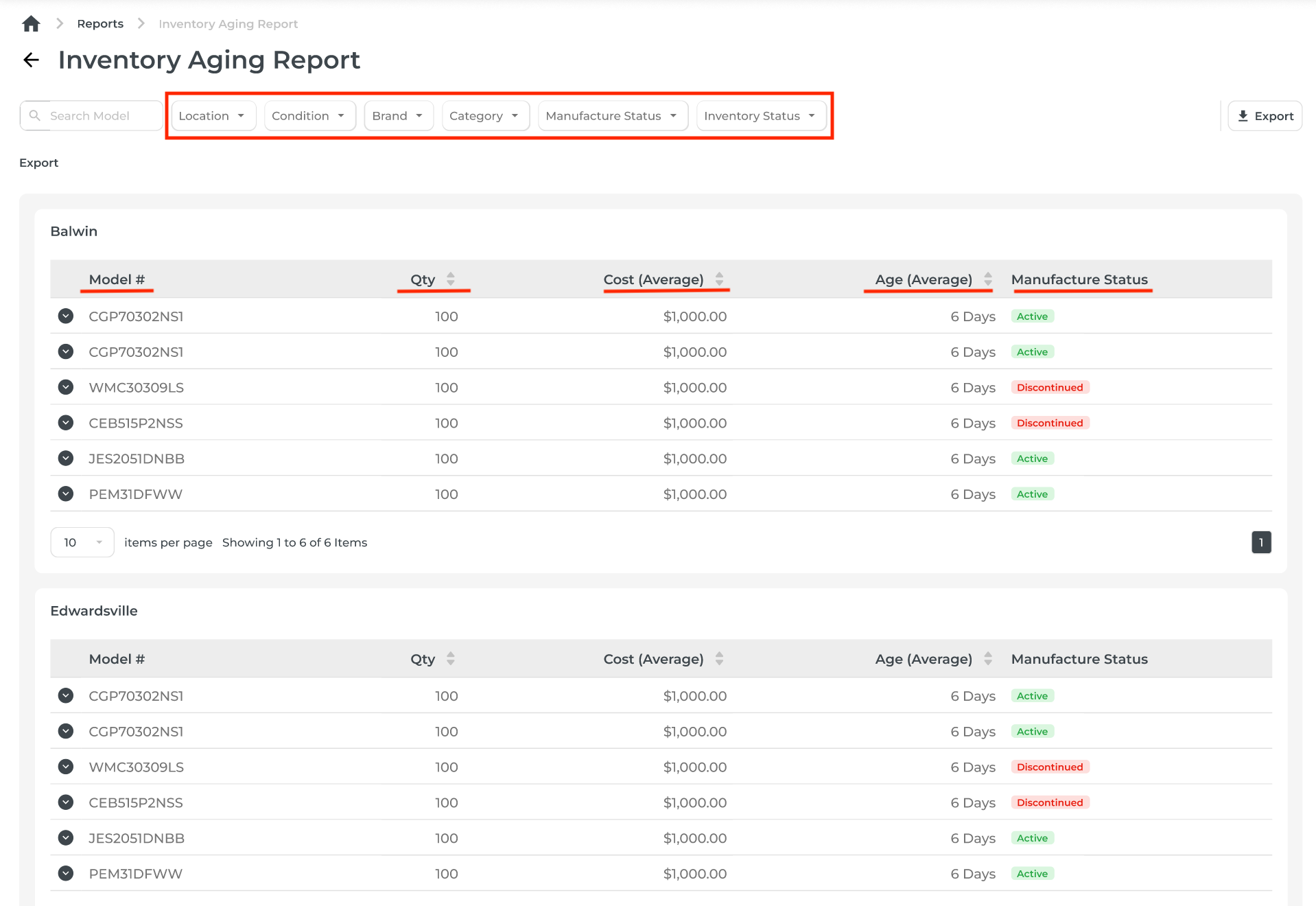
1. 📊 New Report: Inventory Aging Report
Stop Guessing, Start Managing Aging Stock!
We’ve launched a dedicated Inventory Aging Report to help you take control of aging inventory.
- Key Filters: Refine results by Location, Condition, Brand, Category, Manufacture Status, and Inventory Status.
- Summary View: See essential columns like Model, Qty, Cost (Average), and Age (Average) (sorted oldest to newest), and Manufacture status (discontinued or active).

- Drill Down: Expand any model to view a detailed breakdown of individual items with fields like Condition, Serial #, Inventory Status, Cost (Actual), and Age (Received).
- Export Options: Download both summary and detailed views for easy reporting.

😄 Why You’ll Love It: Spot aging stock at a glance and make smarter decisions about promotions, clearances, or restocking.
2. 🗺️ Longitude and Latitude for Delivery Addresses ⭐️💥⭐💥⭐
Ever had an issue with Google Maps not finding the address you entered? Hmm.. HEADS UP!!
Now, you can pinpoint Delivery Locations like a pro!
Manually entered addresses just got an upgrade. Now, you can add delivery locations using longitude and latitude for pinpoint accuracy.
- Map Interface: Search, zoom, and drop a pin to autofill latitude and longitude fields.
- Flexible Options: Enter addresses the traditional way or switch to longitude/latitude when precision is needed.
- Better Deliveries: Improve route planning, reduce delays, and give your drivers exact delivery points.
🤩 Why You’ll Love It? Fewer customer calls, smoother routes, and happier drivers!


3. 🚚 Delivery & Automation: Custom Install Block
More options for you!
Now you can block specific delivery companies or individual drivers from handling custom installs.
Custom Rules
- Set restrictions for delivery methods that aren’t equipped for custom installations.
Streamlined Processes
- Ensure only the right teams handle complex setups.
😁 Why You’ll Love It? Reduce errors and keep your deliveries running smoothly!

The Provider (delivery company) settings will reflect on the Retailer's delivery options automatically.

4. ⏩ Bypass Reschedules for Manual Deliveries
Ever needed to close out a delivery that the driver forgot to?
Yeah, we made it a snap!
New Checkbox
- When rescheduling, select the checkbox first and the “Move to Delivered" button will appear to bypass unnecessary steps.
Automatic Workflow
- Skip inventory adjustments—just pick the delivery method and date.
Seamless Tracking
- All changes are logged for accountability.
🥳 Why You’ll Love It? Save time and minimize frustration when manually completing deliveries.


5. 📅 Delivery Provider Accounts: Capacity Settings Simplified
Take Control of Delivery Capacity, Your Way!
Set Overall Capacity
- Specify total deliveries for the day across all types (In-store, Online, Home Visit).
Set Individual Capacities
- Add up to 3 delivery types with specific limits, like Online Orders, In-Store Orders, Home Visit.
Smart Rules
- Using individual settings automatically disables overall capacity, so nothing gets overbooked.
🥳 Why You’ll Love It: Gain flexibility while avoiding overbooking headaches.

