Platform feature update completed on June 12th, 2025
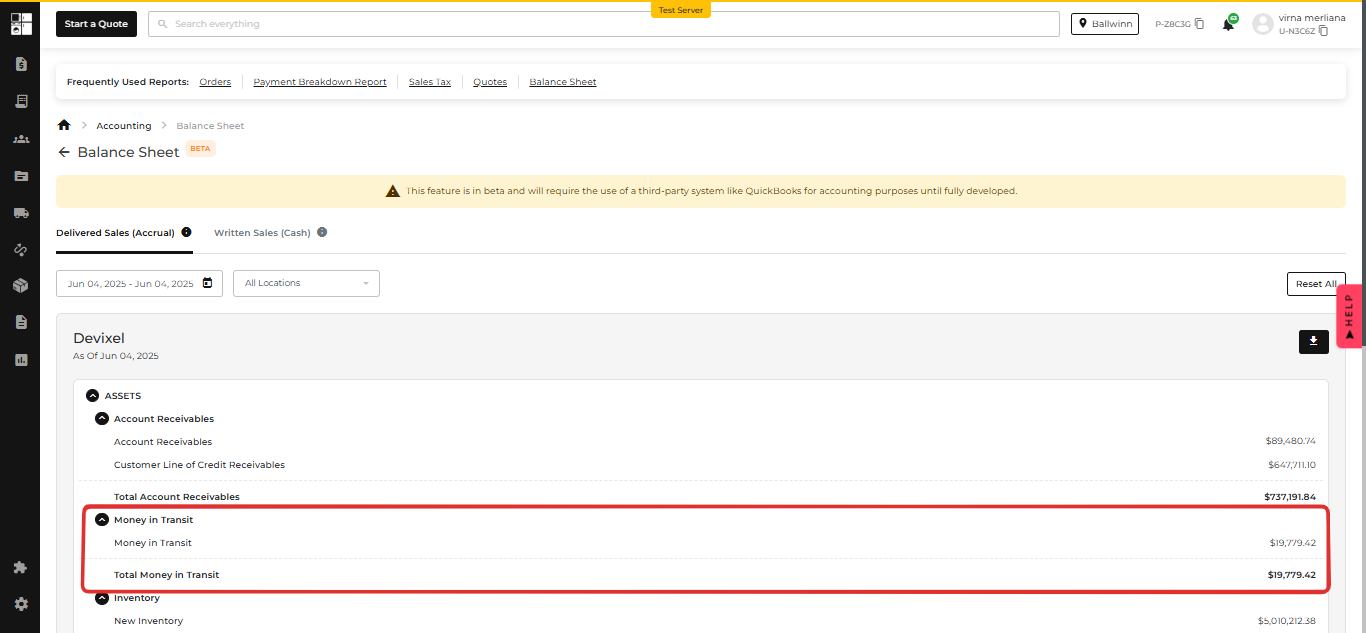
🚀 Balance Sheet Report: Money’s Moving, and Now You Can See It!
💰 New: "Money in Transit" Line Item
We’ve added a shiny new line called "Money in Transit" to help you better track funds that are moving but not quite home yet.
📍 Where You’ll Find It:
Delivered Sales (Accrual) Balance Sheet Report → Under Assets 🏦
🔍 What It Does:
- Displays your current AIO Pay account balance (aka the funds heading your way).
- Click it to jump straight to the AIO Pay Payout Report for more juicy details.
- Works seamlessly with your existing filters and export options.
You now get a clearer financial picture in your reports without wondering where your payouts are. Better visibility = smarter decisions.

🔓 Super Admins Can Now Override Locked Items
Locked items are no longer a blocker—Super Admins can now take action when needed. ✅
🔍 Previously
A refurbished or used item became locked if it was already added to:
- Another user’s cart on the website
- Another user’s quote
Result:
- 🚫 Users could not reserve the item from the Quote Page
- 🚫 Users could not assign the item from the Inventory Page
Even Super Admins couldn’t proceed.
✅ What’s New
Super Admins can override locked refurbished or used items directly from:
- 🔘 Reserve button on the Order Page
- 🔘 Assign button on the Inventory Page
When clicked, a confirmation modal appears:
This item is currently in a customer’s cart or quote. Overriding will make it unavailable to them.

Once confirmed:
- The item is force-removed from the cart or quote
- A changelog entry is created and shown on the quote page, and the inventory stock movement
🔐 Access Control
- Only Super Admins can perform this override
- All other roles still cannot interact with locked items
With this update, Super Admins can handle locked items more smoothly and keep things moving without the usual blockers!