Platform feature update completed on May 15th, 2025
🎉 Changelog: Simplifying Pricing for Better Sales Decisions 🚀
We’ve made some exciting updates to improve how pricing data is displayed. Here’s what’s new:
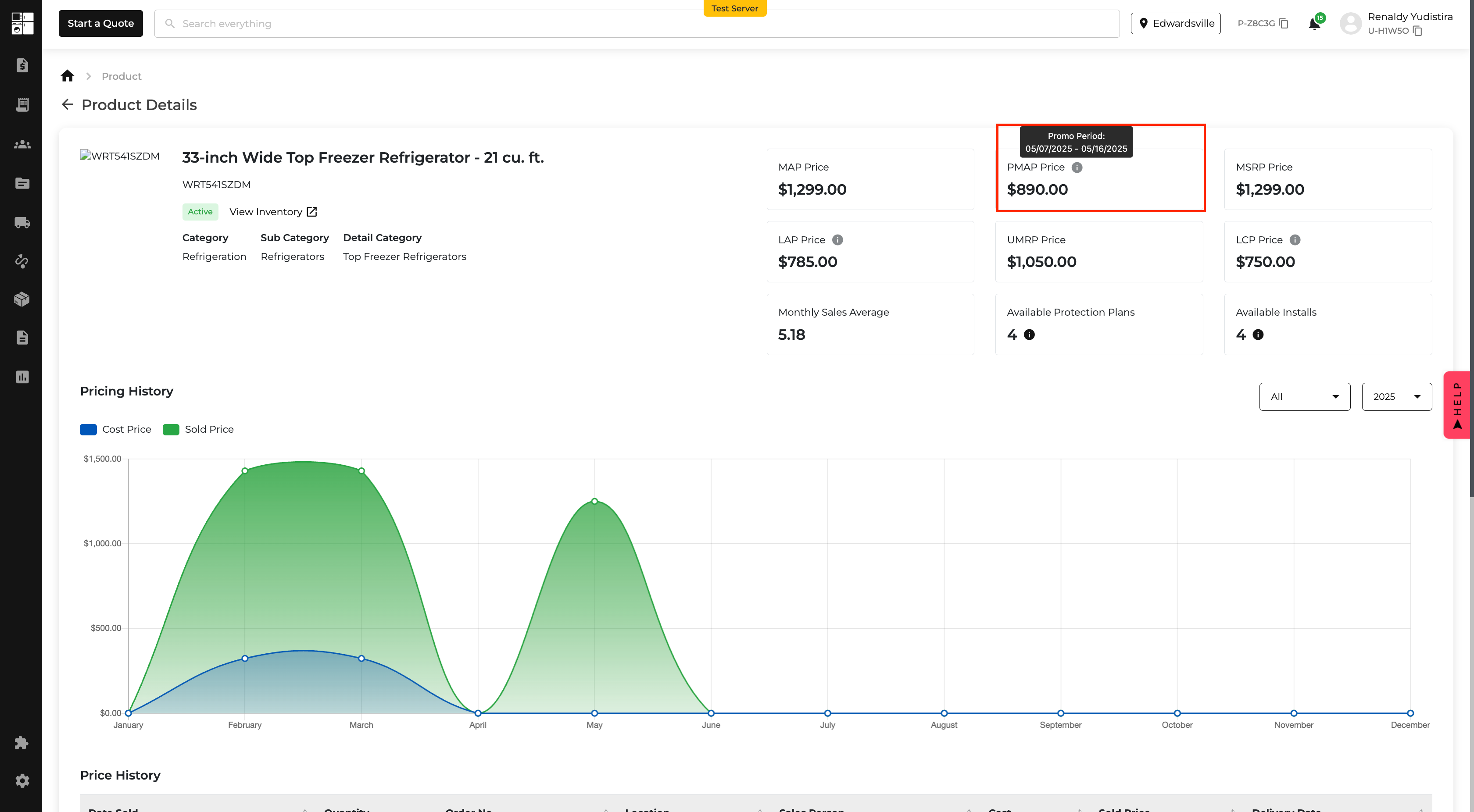
1. Promotional MAP (PMAP) Gets Its Own Spotlight 🌟
- What’s New? Promotional MAP now has its own dedicated block on the Product Details page. No more confusion between Promotional MAP and Regular MAP!
- Why It’s Awesome: You’ll see clear start and end dates for promotions, making it easier to plan and communicate pricing strategies.
- Example:
- Promotional MAP: $888 (Promo Period: 05/10/2025 - 05/17/2025)
- Regular MAP: $1149
2. Competitor Pricing Tailored to Your Selection 🎯
- What’s New? On the Product Details page, LCP (Lowest Cart Price) and LAP (Lowest Advertised Price) now only show data from the competitors you’ve selected in pricing settings.
- Why It’s Awesome: No more clutter! Focus only on the competitors that matter to your business.
- Tooltip Update: The hover-over info now reflects only the selected competitors.
- Example: “Lowest cart price between Lowe’s and Home Depot.”
3. Pricing Analytics Pop-Up: Now More Insightful 📊
- What’s New? The Pricing Analytics pop-up now includes:
- Promotional MAP with start and end dates.
- Regular MAP as a separate data point.
- Why It’s Awesome: Easily compare promotional and regular pricing to make informed decisions.


🎉 Smarter Customer Directory Search = Happier Teams 🔍
We’ve upgraded the Customer Directory search to help you find the right customer faster and with less noise. Here’s what’s new:
Say Hello to Targeted Search Filters 🎯
- What’s New?
- Name
- Company Name (only for Company)
- Billing Name (only for Company)
- Billing Address ZIP Code
- Phone Number
- Why It’s Awesome:
We’ve replaced the old “All” search with focused, high-value filters right at the top of your filter list:
No more digging through irrelevant results. Now you can search smarter and find exactly who you need, without the clutter. 🧹


🚚 New Driver App Update: No More Missed Instructions on Deliveries!
- What’s New?
- Why You’ll Love It:
- Where You’ll See It:
- 👉 Survey
- 👉 Service
- 👉 Install
We’ve ensured that drivers can now see the Home Visit description right where they need it, in the Driver App under the Home Visit section.
Before this update, drivers were flying blind. Important delivery details (like “bring 30 dishwasher lines”) weren’t visible on the order page, which meant missed items, incomplete deliveries, and extra trips back to the warehouse. 😩
Now, those critical notes added by your sales team are crystal clear in the Driver App.
That means fewer mistakes, smoother deliveries, and happier teams. 🎉
Inside the Driver App dashboard, under each Home Visit type:

🧾 New: Sales Tax for Protection Plans!
- What’s new?
- Why this matters:
- Here’s what you’ll see:
- A new Sales Tax on Protection Plans section in your Accounting > Settings > Sales Tax tab
- A friendly toggle to turn this setting ON or OFF
- Helpful notes and alerts to guide you based on your current tax setup
- A reminder to check your local tax laws (because, well, they vary a lot)
- 🚨 Heads up!
You can now decide whether or not to apply sales tax to Protection Plans (warranties) right from your Accounting Settings!
Some states say "yes" to taxing warranties, some say "no"—now you’re in control. No more awkward workarounds or compliance headaches.
If you haven’t set up your general sales tax settings yet, we’ll let you know with a clear warning so nothing gets missed.

