Platform feature update completed on May 8th, 2025
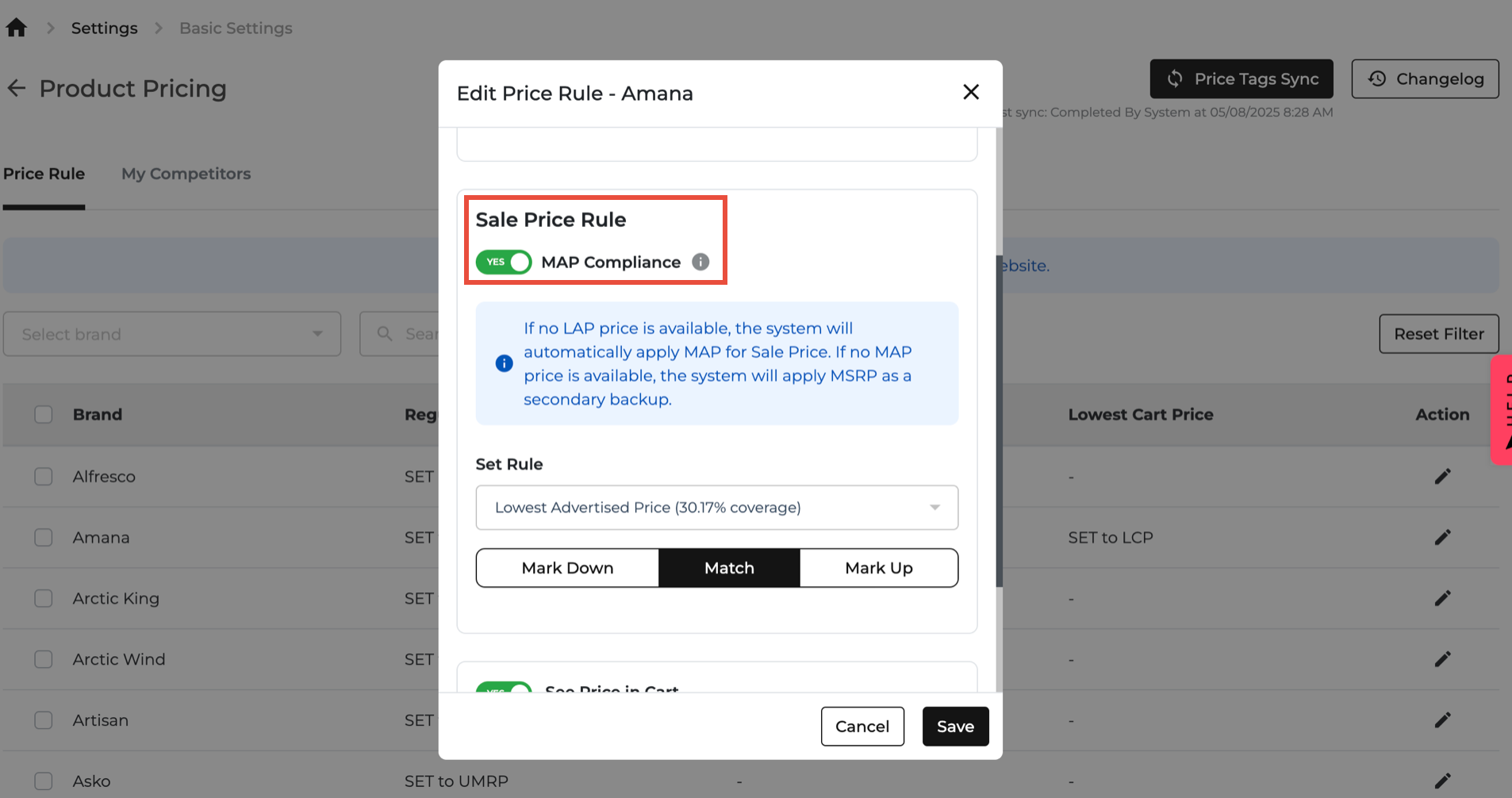
🚨 New Feature Alert: MAP Compliance Toggle!
We just made pricing a whole lot smarter. Say hello to the new MAP Compliance Toggle, now available in the Edit Price Rule section (look in the Sale Price Rule setting)!
🧠 What’s It For?
This toggle is your best friend when it comes to protecting your pricing from breaking brand rules. Just turn it on, and we’ll make sure your sale prices stay within the MAP (Minimum Advertised Price) or PMAP (Promotional MAP) guidelines—automatically.
🔍 How It Works:
- Turn on MAP Compliance → We’ll check each model’s final price.
- If a model’s price drops below MAP or PMAP:
- We’ll auto-adjust just that model using the correct price.
- Promo active? ✅ Use PMAP.
- No promo? 🛑 Use MAP.
- All other models? They’ll stick to your selected pricing rule + markdowns.
- You stay in control — pick any rule (LAP, MSRP, etc.) and add markdowns or markups as you like.

📌 Important Notes:
- Works only for Sale Price Rules — not regular pricing.
- Available for these brands:
- GE group, Whirlpool group, Electrolux/Frigidaire, LG, Bosch, and Samsung
🚀 New Update: DMI Integration Just Got Smarter!
We’ve turbocharged your product and pricing insights with our latest DMI Integration Update! Here’s what’s new and exciting across Inventory, Product Navigation, and Pricing Analytics:
📦 Inventory Page – Now With Extra Data Power!
Your Inventory view just got a serious upgrade with fresh insights from DMI. You’ll now see:
- Item Classification Info: Including descriptions and GoTo Models
- Product Status: Like whether it's In Transit
- DMI & Manufacturer Pricing:
- Competitor Pricing: See how your prices stack up vs Best Buy, Home Depot, and Lowes
🧭 Bonus: We reorganized the hide/show columns tool so you can easily find what you need—grouped by helpful categories like Product Status and Manufacturer Pricing.

🔗 Clickable SKUs – Fast-Track to Product Details!
No more hunting around!
Now, if the product exists in our system, just click the SKU number to instantly open its Product Details Page.
⚠️ If it’s not yet in the system, we’ll give you a heads-up!

📊 Pricing Analytics – Now One Click Away!
We’ve added a new “Pricing Analytics” button at the end of every row.
Hit it to unlock a detailed, full-screen view of all pricing data for that product.
🚫 Don’t see the button? That means the product isn’t in our system yet.

📌 Sticky Columns – Because Scrolling Shouldn’t Be a Struggle
The Location and Model # columns are now sticky.
That means they’ll stay put while you scroll sideways—no more getting lost in a sea of columns.
